Data Flow
The Glean architecture consists of a Query Path, Data Ingestion Path, and Data Processing Pipeline. This article provides a comprehensive overview of these paths, and how we ensure that users can access and leverage your company's enterprise data securely and effectively.
Query Path
The Glean Web App
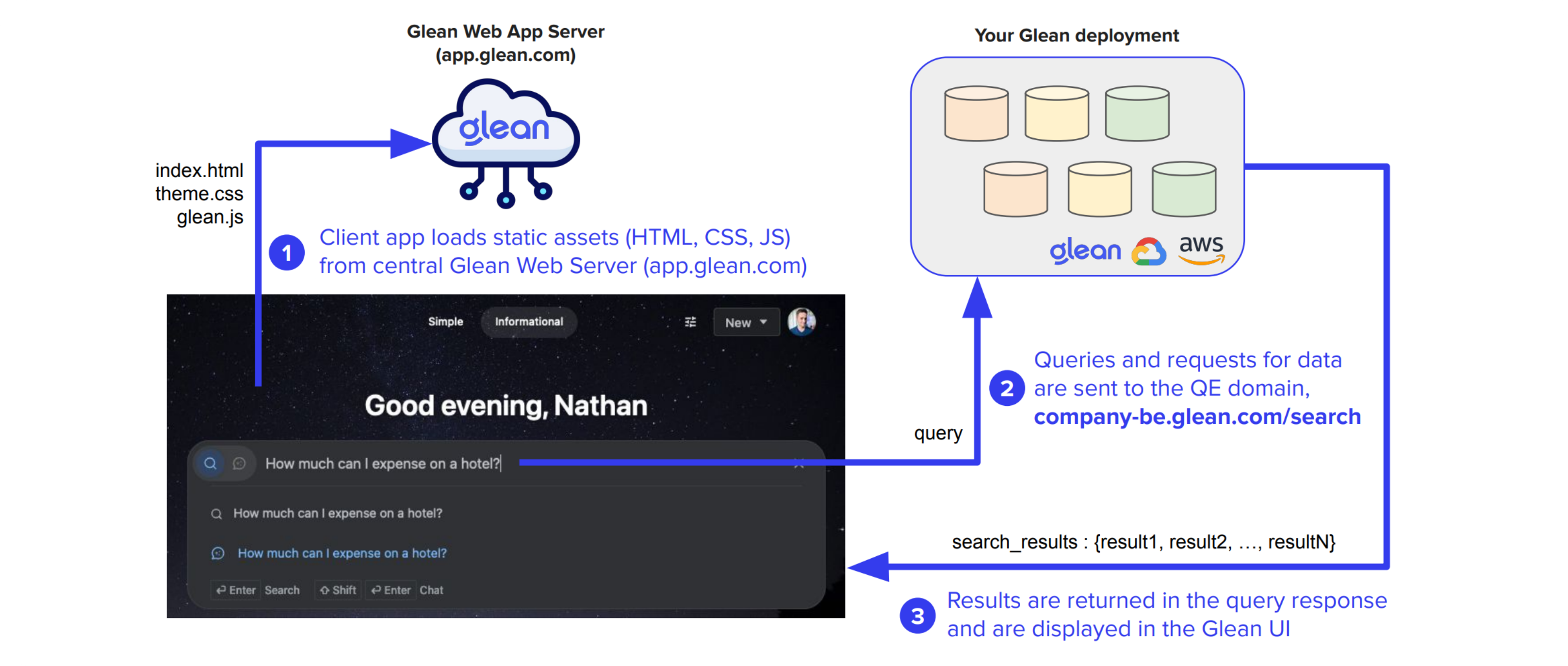
Users conduct searches through the Glean Web App, accessible at https://app.glean.com. This global web application is hosted within Glean's central cloud infrastructure. The client web app, which includes static assets such as images, CSS, and JavaScript, is served from this location.
Upon loading the client code in a browser, the web client checks the user's local storage to determine if a session state exists. If no state is found, indicating the user is not logged in, the user must authenticate to proceed. Glean requires authentication for all searches; anonymous searching is not supported.
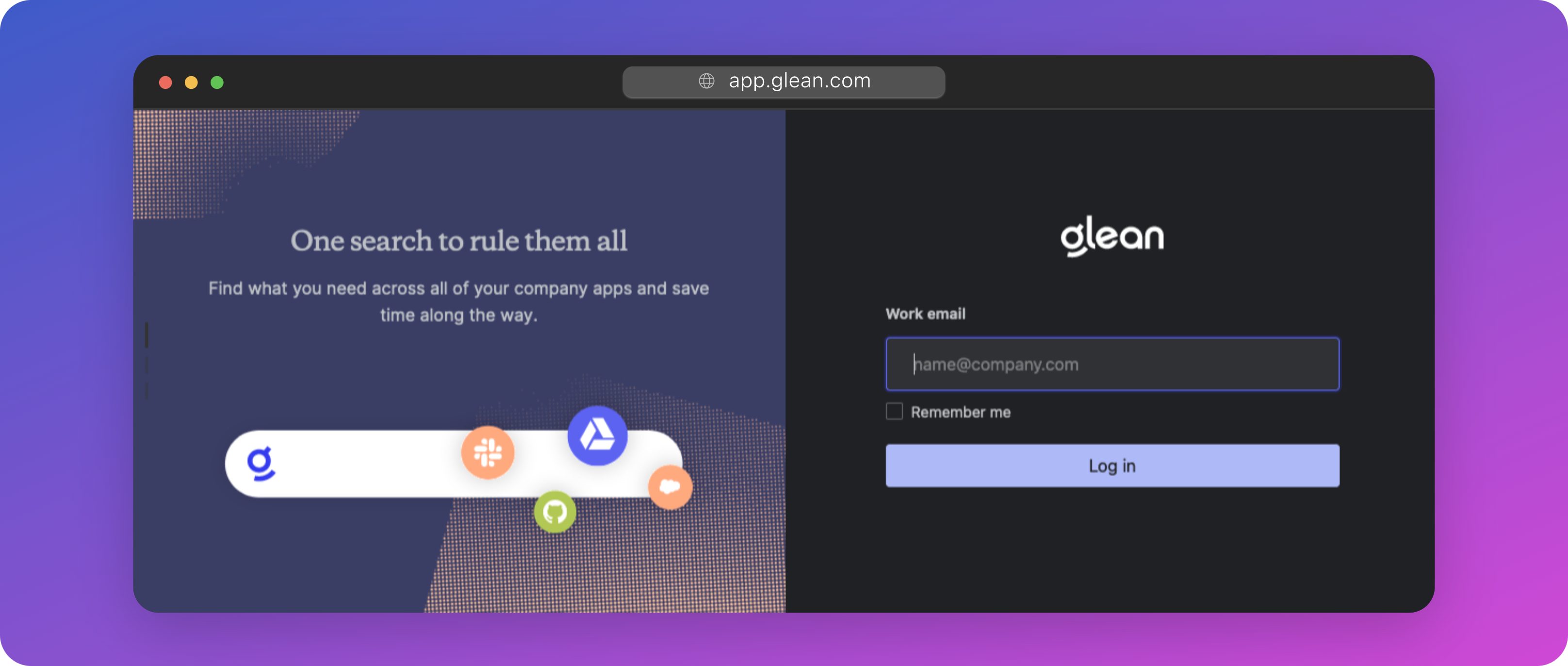
At this point, the authentication process is initiated with a prompt for the user to enter their email address (e.g., user@company.com).
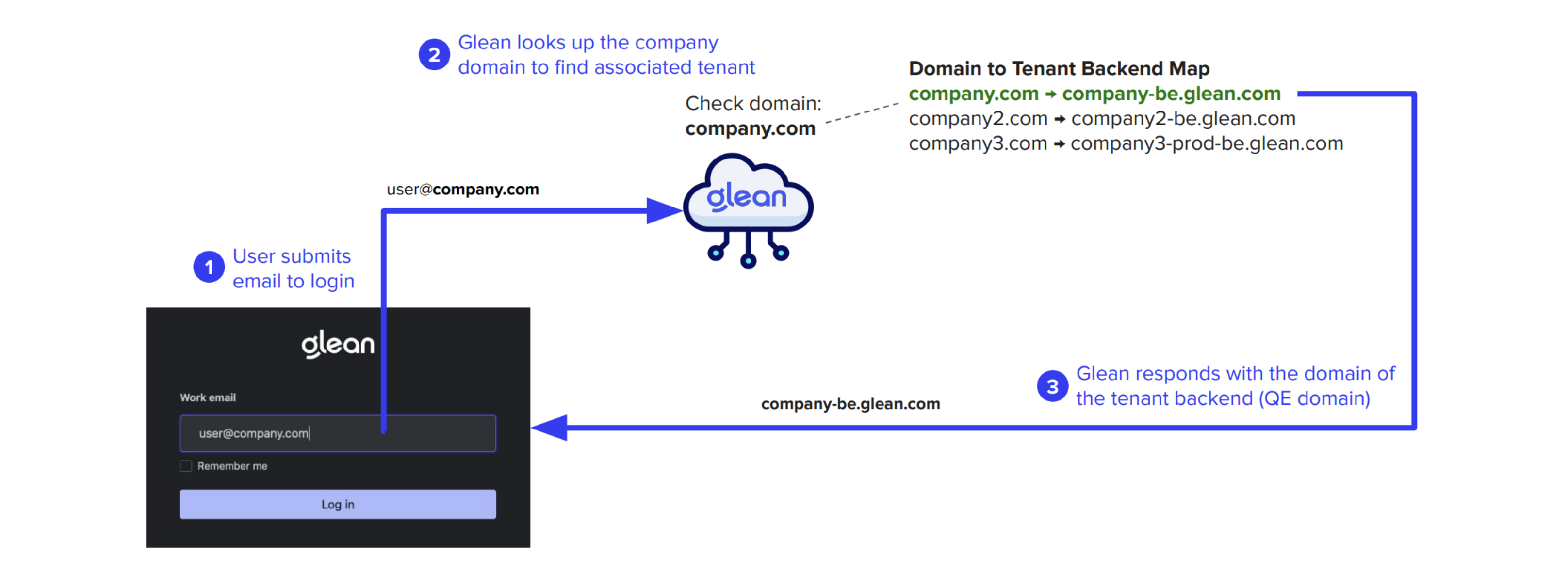
For each customer tenant, Glean necessitates a list of domain names used by the company for authentication purposes (such as company.com, subsidiary.com, etc.). These domains are then associated with the tenant's backend domain, known as the Query Endpoint (QE); through which tenant-specific data is accessed. This domain is of the form <tenant_id>-be.glean.com.
When the user submits their email address into the Glean login page, the Glean Web App conducts a domain lookup and responds with the QE domain specific to that user's Glean tenant (i.e., <tenant_id>-be.glean.com). This QE domain is then stored in the user's browser's local storage. Subsequently, all interactions with the client are directed to the QE domain rather than app.glean.com.
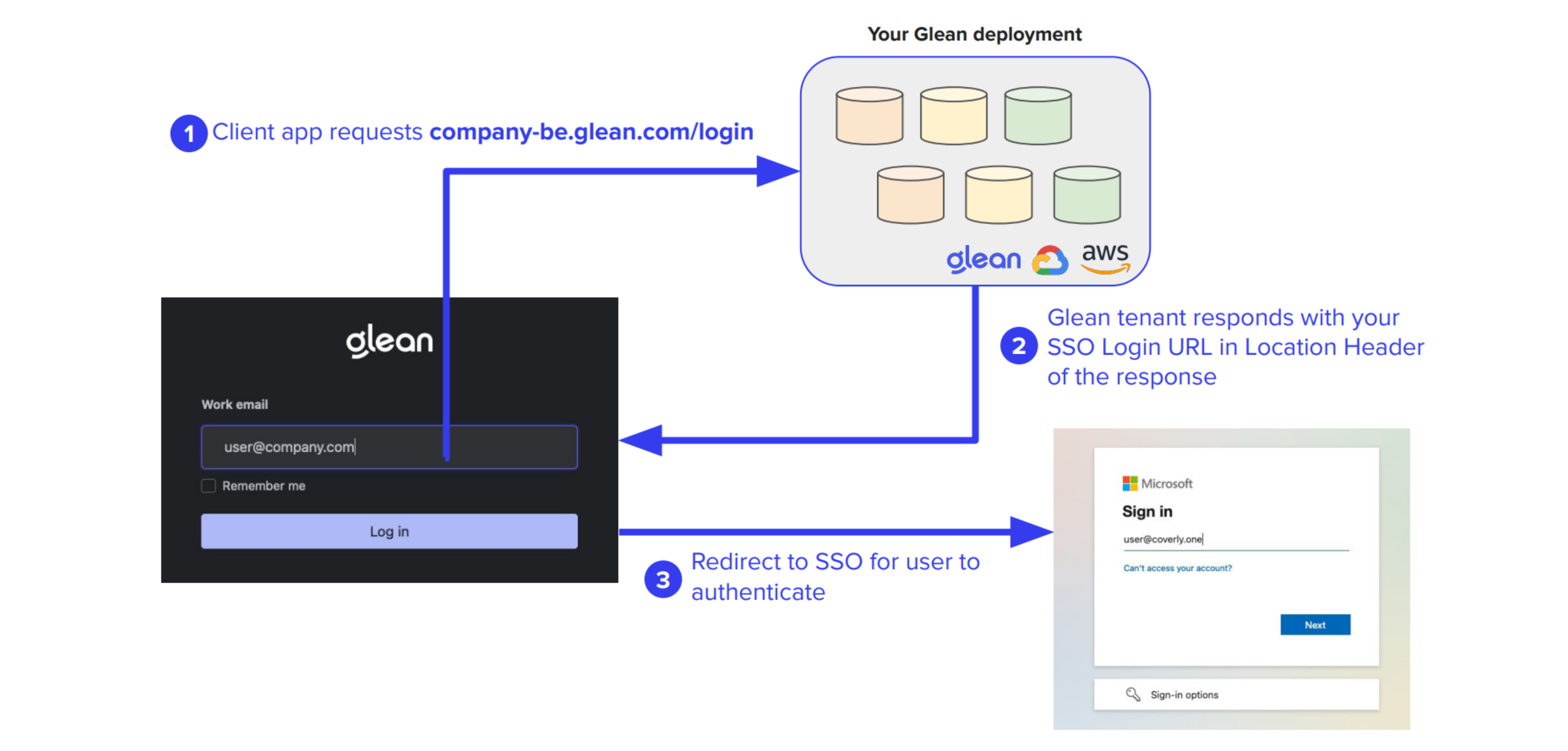
The QE domain resolves to a static IP that is uniquely assigned to your company's Glean tenant, wherever it is deployed. This could be within Glean SaaS, or inside your own GCP or AWS environment (cloud-prem). Recall that Glean builds every tenant from scratch in the target environment using a single-tenant architecture.
At this juncture, if the user is unauthenticated, the QE will redirect them to the Single Sign-On (SSO) provider that has been configured for the company tenant. It is essential to note that the use of Glean is contingent upon the configuration of SSO.
Once the user successfully authenticates, all subsequent queries and search results are securely transmitted over HTTPS from the user's browser to the QE. This communication occurs asynchronously via XMLHttpRequests (XHR).
Diagram
A diagram of the flow from unauthenticated user to query is included below (you may wish to zoom in to see the details).
sequenceDiagram
    participant User as User
    participant Browser as User's Browser
    participant GWA as Glean Frontend<br>(app.glean.com)
    participant OIDC as SSO Provider<br>(OIDC)
    participant QE as Tenant Backend<br>(tenant_id-be.glean.com)

    User->>Browser: Navigate to https://app.glean.com
    Browser->>GWA: Request client code
    GWA->>Browser: Serve static client code (HTML, CSS, JS)
    Browser->>User: Display login prompt
    User->>Browser: Enter email (foo@customerdomain.com)
    Browser->>GWA: Login request
    GWA->>GWA: Lookup tenant based on email domain
    GWA->>Browser: Redirect to tenant backend login URL
    Browser->>QE: Redirect request (tenant_id-be.glean.com/login)
    QE->>QE: Check authentication
    QE->>Browser: Redirect to SSO Provider (if unauthenticated)
    Browser->>User: Display login prompts
    User->>Browser: Enter credentials & MFA
    Browser->>OIDC: Authentication request
    OIDC->>Browser: Provide access consent with ID Token and Authorization Code
    Browser->>QE: Redirect with ID Token and Authorization Code
    QE->>OIDC: Exchange Authorization Code for Access Token
    OIDC->>QE: Provide Access Token
    QE->>Browser: Authenticate user and cache tenant backend URL in local storage
    User->>Browser: Enter search query
    Browser->>QE: Send search query over HTTPS with Access Token
    QE->>Browser: Return search results over HTTPS
    Browser->>User: Review search results
Examining Traffic to the Query Endpoint (QE)
Specifically, when a user executes a search, the client web app makes an asynchronous request to:
https://<tenant_id>-be.glean.com/api/v1/search
Examining the header of the request reveals the following:
{
    "cursor": "[...snip...]",
    "maxSnippetSize": 324,
    "pageSize": 10,
    "people": [],
    "query": "expense policy",
    "requestOptions": {
        "debugOptions": {},
        "disableQueryAutocorrect": false,
        "facetBucketSize": 0,
        "facetFilters": [],
        "timezoneOffset": -660
    },
    "sc": "",
    "sessionInfo": {
        "lastSeen": "2023-12-13T05:03:49.808Z",
        "sessionTrackingToken": "[...snip...]",
        "lastQuery": "expense policy"
    },
    "sourceInfo": {
        "clientVersion": "fe-release-2023-12-05-86ae10d",
        "initiator": "MORE",
        "modality": "FULLPAGE"
    },
    "timeoutMillis": 10000,
    "timestamp": "2023-12-13T05:04:14.093Z",
    "trackingToken": "[...snip...]"
}
A description of each field can be found in our Developer Documentation.
Examining the response of the request (some fields have been omitted for brevity):
{
    "trackingToken": "[...snip...]",
    "sessionInfo": {
        "sessionTrackingToken": "[...snip...]",
        "lastSeen": "2023-12-13T05:04:14.385838873Z",
        "lastQuery": "expense policy"
    },
    "results": [
        {
            "trackingToken": "[...snip...]",
            "document": {
                "id": "GDRIVE_11[...snip...]Kp-P",
                "datasource": "gdrive",
                "docType": "pdf",
                "parentDocument": {
                    "id": "GDRIVE_1t[...snip...]qqsy",
                    "datasource": "gdrive",
                    "docType": "Folder",
                    "title": "Company Policies",
                    "url": "https://drive.google.com/drive/folders/1t[...snip...]qqsy"
                },
                "title": "CompanyExpensePolicy-sept2023.pdf",
                "url": "https://drive.google.com/file/d/11[...snip...]Kp-P",
                "metadata": {
                    "datasource": "gdrive",
                    "datasourceInstance": "gdrive",
                    "objectType": "pdf",
                    "container": "Insurance Policies",
                    "containerId": "GDRIVE_1t[...snip...]qqsy",
                    "mimeType": "application/pdf",
                    "documentId": "GDRIVE_11f...snip...]Kp-P",
                    "createTime": "2023-06-05T20:00:25Z",
                    "updateTime": "2023-06-16T11:59:42Z",
                    "author": {
                        "name": "Sam Sample",
                        "obfuscatedId": "B79[...snip...]3D8"
                    },
                    "owner": {
                        "name": "Sam Sample",
                        "obfuscatedId": "B79[...snip...]3D8"
                    },
                    "visibility": "SPECIFIC_PEOPLE_AND_GROUPS",
                    "assignedTo": {
                        "name": "Sam Sample",
                        "obfuscatedId": "B79[...snip...]3D8"
                    },
                    "updatedBy": {
                        "name": "Sam Sample",
                        "obfuscatedId": "B79[...snip...]3D8"
                    },
                    "datasourceId": "11[...snip...]Kp-P",
                    "interactions": {},
                    "documentCategory": "COLLABORATIVE_CONTENT"
                }
            },
            "title": "CompanyExpensePolicy-sept2023.pdf",
            "url": "https://drive.google.com/file/d/11[...snip...]Kp-P",
            "snippets": [
                {
                    "snippet": "",
                    "mimeType": "text/plain",
                    "text": "You can submit them to your manager using the current expense reporting method (current method here) within three months after the date of each expense. If your manager approves your expenses, you will receive your reimbursement within two pay periods on your regular paycheck."
                }
            ]
        },
        {...more results...}
    ],
    "errorInfo": {},
    "requestID": "[...snip...]",
    "backendTimeMillis": 89,
    "metadata": {
        "rewrittenQuery": "expense policy",
        "searchedQuery": "expense policy",
        "originalQuery": "expense policy"
    },
    "cursor": "[...snip...]",
    "hasMoreResults": true
}
Data Ingestion Flow
Glean integrates with a variety of enterprise data sources. For each connected source, we deploy a specialized connector within the tenant's dedicated cloud project. These connectors are responsible for retrieving content, tracking user activity data, and mapping permissions from their respective sources. They operate on a scheduled basis and can also be triggered by real-time webhook events.
Once the data is fetched, it is securely stored within Glean's document and identity repositories. Following this, a sophisticated dataflow pipeline is initiated. This pipeline's role is to meticulously combine the content with associated permissions, user data, and activity metrics—such as creation, edit, and view dates—into a secure, searchable index.
The process of data retrieval by the connectors is conducted over HTTPS. For SaaS applications like Google Drive, this occurs via the public internet. Conversely, for applications hosted within your own network infrastructure, such as an on-premises Jira server, a secure private connection is established (via VPN or Shared VPC) to ensure the highest level of data protection and privacy. Alternatively, data can be pushed to Glean from inside your network via our Indexing API.
Data Processing Pipelines
Once the data is fetched, it is further processed within your tenant. All data processing happens using Google Dataflow pipelines, and your data never leaves the your tenant's project.