Exclusion Rules
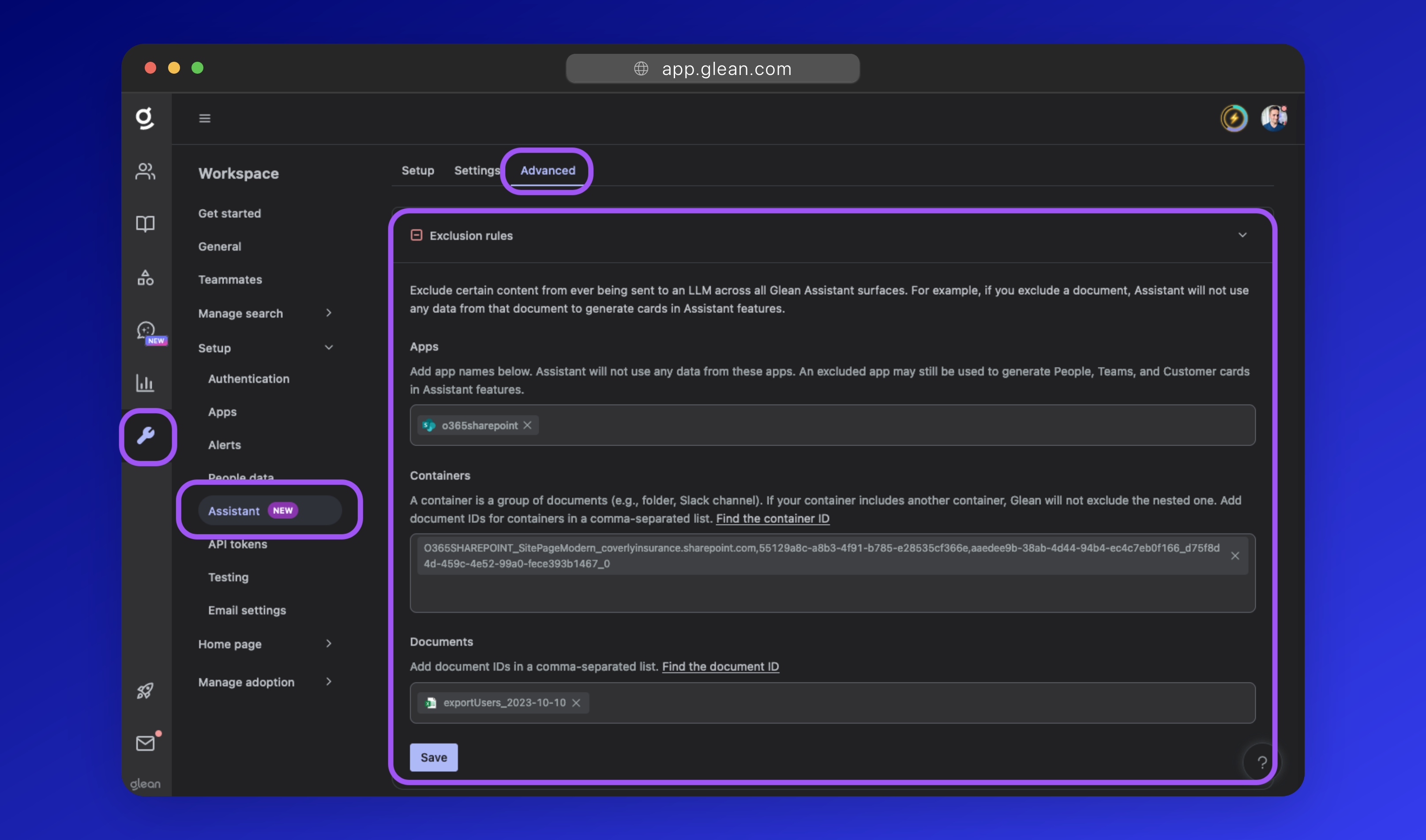
You can exclude certain content from ever being sent to an LLM across all Glean Assistant interfaces.
For example, if you exclude a document, Glean Assistant will not use any data from that document to generate responses; even if a user is permitted to access the document content.
Supported Exclusion Rules
Exclusions can be set based on:
- Datasource - You can select an entire datasource to exclude from Assistant, e.g. Workday.
- Containers - A container is a group of content that spans across multiple datasources. Useful for excluding specific content in more than one location, e.g.
spreadsheets,from: user=nathan@company.com, etc. - Documents - You can select individual documents to exclude from Assistant, e.g.
plans_for_world_domination.docx
Configuration
To configure exclusion rules for Glean Assistant:
- Navigate to Workspace Settings > Setup > Assistant and click the Advanced tab.
- Expand the Exclusion rules dropdown, and populate datasources, containers, or documents you wish to exclude. The Glean UI will help you find and identify the IDs of the containers or documents you need to exclude.
- Click Save to persist your changes.